


TREBLE CAT
4.312.00 Reviews
App Specs
- Version
- 3.5
- Updated On
- License
- $2.49
- Downloads
- 10,000+
- Developer
- Melody Cats
- Categories
- Music
- Platform
- Android
Screenshots
 Analysis by AppCompare
I approached TREBLE CAT as a small practice game rather than a replacement for a full music course. Its purpose is narrow and clear: it helps me recognize notes on the treble clef by turning each identification into a quick response. That focus is its biggest strength. I do not have to open a long lesson, read through theory, or prepare an instrument before starting. I can simply begin looking at notes and testing whether I can name them correctly.
That simplicity also explains who will enjoy it most. Beginners who are still slow at reading treble-clef notes can use it for short bursts, while parents or teachers may find it useful as a lightweight exercise between more complete lessons. I would not choose it as my only music-learning tool, because recognizing a symbol is not the same as understanding rhythm, key signatures, intervals, or musical phrasing. Still, as a focused music game, it gives one basic skill a surprisingly direct workout.
How the note-reading loop feels in real use
I find the note-reading loop most useful when I treat each answer as a chance to notice how I reached it, not just whether I was right. If I keep counting from a familiar staff position, that tells me which visual relationships still need practice; if I recognize the note at a glance, I can move on without overthinking. That distinction makes the next question—how to get started without adding needless friction—worth considering.
The first action is immediate recognition
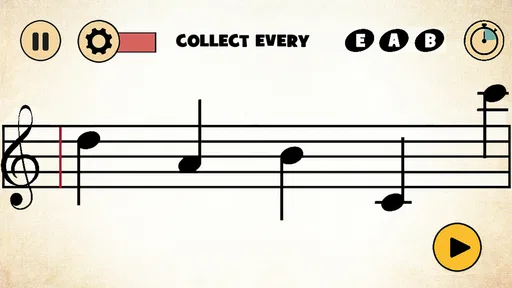
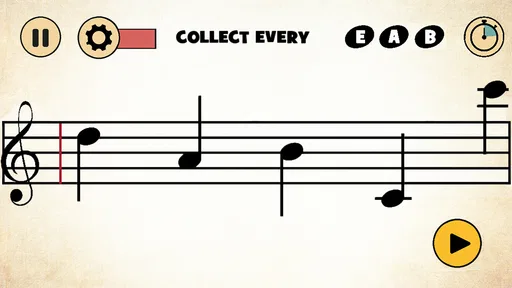
The central action is straightforward: I see a note placed on the treble staff and identify it. The challenge is not complicated by a story, a character to control, or a large collection of menus. That makes the first few attempts feel more like a reflex drill than a traditional game, which is exactly what I want when my goal is to become quicker at reading music.
At first, I naturally rely on familiar reference points. I may recognize a note because I remember where a known line or space sits, then count upward or downward from there. That works, but it is slower than instantly seeing the note. The useful part of repeated play is that the game encourages me to move away from counting every position and toward recognizing the visual shape of the note’s location.
This is especially helpful for someone who can name notes eventually but hesitates when reading a beginner score. A short delay can be enough to interrupt a melody. Practicing with a single note at a time isolates that delay, making it easier to notice whether the problem is memory, visual scanning, or uncertainty about the staff.
I also like that the activity does not require a piano or keyboard beside me. If I am waiting for an appointment or have a few minutes before practice, I can work on note recognition without making noise. That makes it more convenient than exercises that depend on an instrument, although it also means the game cannot tell me whether I can connect the note to a physical key or a sung pitch.
Worth Reading Before You Choose

EA SPORTS FC Mobile 26 Is a Bigger Football Game, but It Takes Time

Flipboard Shows What News Apps Must Do Beyond the Feed

Switching to Android Auto Means Rethinking Your Driving Routine

Google Calendar Makes a Crowded Week Easier to Manage

Ludo King Makes the Most of the Minutes Between Plans

Baby Panda World Brings Quick Play to Modern Phones, but Its Game Library Feels Busy
Feedback creates a steady rhythm
The feedback is what gives the exercise its game-like quality. I make a choice, find out whether it was right, and move on. A correct answer gives me a small sense of progress; a wrong answer exposes the exact place where my visual memory is weak. The rhythm is simple, but it keeps the activity more engaging than staring at a page of flashcards.
That rhythm matters because note reading improves through many small recognitions rather than one long explanation. I can understand the treble clef in theory and still pause at individual notes. Here, the repeated question-and-answer pattern puts the emphasis on retrieval. I am not merely rereading the names of notes; I am being asked to produce the answer before moving forward.
One practical technique is to treat mistakes as information instead of immediately trying to erase them with faster guesses. When I miss a note, I pause long enough to locate it on the staff and connect it with a reference note. If the same position keeps causing trouble, I know that I need targeted practice away from the game as well. The app is good at exposing a weakness, but I still have to decide how to repair it.
Another useful approach is to keep the response honest. It is tempting to tap quickly based on a vague feeling, especially when the game starts to feel repetitive. That may improve speed temporarily, but it does not build reliable reading. I get more value when I answer from recognition and accept that a slower correct response is better practice than a fast guess.
The feedback also makes the game suitable for different starting points. A complete beginner can use it to become familiar with the staff, while a player who already knows the notes can use it as a speed check. The same action serves both users, but the goal changes: one person is building basic associations, and the other is trying to remove hesitation.
The reward is fluency, not a collection of extras
The most meaningful reward is the gradual feeling that the staff becomes easier to read. I notice it outside the game when I look at a beginner melody and spend less time translating every note. That transfer is the reason to return. The immediate satisfaction of a correct answer is pleasant, but the lasting benefit is reducing the mental effort between seeing a note and knowing its name.
This is an important distinction when comparing it with larger music-learning apps. Many alternatives combine note reading with lessons, songs, ear training, rhythm exercises, instrument practice, or animated progress systems. Those products can offer a broader path, especially if I want a complete curriculum. TREBLE CAT is more disciplined: it concentrates on one narrow skill and avoids asking me to manage several kinds of practice at once.
For a child, the game format may make repetition feel less like homework. The age rating is Everyone, which fits the uncomplicated educational purpose. I would still guide a young learner at the beginning, not because the activity is difficult to understand, but because a child may memorize button positions without truly learning the staff. Asking the child to point to the note’s line or space before answering can turn quick tapping into better musical practice.
For an adult beginner, the reward is different. I may not need bright presentation or a long progression system; I may simply want to stop freezing when I open a score. In that situation, the game’s compact focus is useful. It gives me a low-pressure way to repeat a basic skill without feeling that I have to complete a full lesson every time I practice.
There is also a trade-off. Because the reward comes mainly from improved recognition, users who expect a rich game economy may find the experience thin. I would not install it for narrative, exploration, collecting, or deep strategy. Its satisfaction depends on whether I care about reading treble-clef notes more quickly. If that goal is not relevant, the narrow design will feel limiting rather than refreshing.
Resetting a session keeps practice approachable
A good practice game needs an easy stopping point, and this one works best when I treat each attempt as a compact session rather than a commitment to a long course. I can begin with the intention of doing a small amount of recognition work, notice where my accuracy or confidence stands, and stop before the exercise becomes mindless.
The reset is valuable because repetition can lose quality when I continue only to chase a better feeling. After a few rounds, I may start answering from rhythm instead of sight. Starting again later gives my memory a chance to settle and lets me test whether the notes are becoming familiar rather than merely predictable within one sitting.
I recommend using a simple rotation instead of playing continuously. On one session, I might focus on careful identification and say the note name aloud. On another, I might aim for quicker recognition while still refusing random guesses. A third session can happen immediately before reading a beginner piece, using the game as a mental warm-up. This workflow makes the app part of practice without pretending that it covers the whole lesson.
Resetting also helps reveal whether progress is real. If I only play until I feel comfortable, I may confuse short-term familiarity with durable learning. Returning after a break and seeing whether the same notes still feel obvious is a better test. When a difficult position reappears, I can mark it mentally and review the treble staff away from the screen.
The main limitation is that a focused drill can become monotonous. There is no substitute here for playing an actual melody, listening to the result, or working with a teacher who can correct broader musical habits. I would skip this game if I wanted a complete guided program, detailed explanations of notation, or practice that connects every note to an instrument. A broader learning app or a teacher would be a better choice for those needs.
Where it fits beside ordinary alternatives
The usual alternative is a paper flashcard, a note-name worksheet, or a general music app with a note-reading section. Flashcards can be excellent because they allow deliberate review of difficult notes, and worksheets may explain the staff more clearly. General music apps usually provide more variety. TREBLE CAT sits between those options: it is more active than passive cards, but less comprehensive than a full learning platform.
Its advantage over paper practice is the immediate response after each answer. I do not need to check a separate answer sheet, and the next prompt arrives without setup. Its advantage over a broad app is focus. I can open it for note recognition without being drawn into unrelated exercises. The disadvantage is the same as its advantage: if I need explanations, musical context, or a broader progression, I will quickly reach the edge of what this format can provide.
I would use it alongside an instrument rather than instead of one. A useful routine is to spend a short period identifying notes, then open a simple score and play slowly. That exposes a different problem: perhaps I know the note names but cannot find the keys quickly, or I read accurately but lose track of rhythm. The game helps with the first layer, while the instrument reveals whether that knowledge transfers into performance.
Singers can use the drill as a visual reading aid, but they should not mistake note names for pitch training. Knowing that a symbol represents a particular note does not automatically mean I can sing it accurately. Ear-training work, a keyboard reference, or vocal guidance is still needed when pitch is the main goal.
Practical details before choosing it
TREBLE CAT is made by Melody Cats and is available as a paid game for $2.49. That price makes the decision fairly simple for someone who specifically wants a focused treble-clef drill, but less compelling for a casual user who may only try it once. Since the task is narrow, I would decide based on whether note recognition is an active need rather than on the size of the feature list.
The game has an average rating of 4.3 from around 118 ratings, with roughly 12 written reviews. It has passed 10K installs, so it is not an obscure experiment with no audience at all, though it is also not a massive mainstream learning platform. The current version is 3.5, and it was released on April 1, 2012, which gives it a long presence but also makes me view it as a focused utility rather than a modern all-in-one course.
It requires an operating system version 10 or later. That is worth checking before paying, particularly if I am using an older device. The age classification is Everyone, so the content itself is suitable for a broad audience. These details do not change the core experience, but they matter when I am deciding whether it fits a child’s device, an older phone, or a shared family tablet.
The most important buying question is not whether it contains enough content for a complete musical education. It does not need to do that to be useful. The question is whether I want a direct way to repeat treble-clef identification without carrying cards or opening a larger course. If the answer is yes, the small scope becomes a benefit. If I want rhythm, ear training, instrument technique, and theory in one place, I should look elsewhere.
My verdict on the complete loop
The action is clear: identify the note. The feedback is immediate enough to keep the exercise moving. The reward is a little more fluency each time I recognize a staff position without counting. The reset makes it easy to return for another short practice session instead of treating music study as an all-or-nothing task.
That loop works because the game does not distract from the skill it is trying to build. I can use it before piano practice, during a spare few minutes, or as a gentle introduction to reading treble notation. My strongest recommendation is to combine it with real scores and an instrument, because that is where I can check whether faster recognition becomes actual music making.
The best reason to choose TREBLE CAT is its narrow, repeatable practice loop. It is not the right purchase for someone seeking a complete course or a rich game world, and its focused format may feel repetitive after the novelty fades. For a beginner who wants to stop hesitating over treble-clef notes, though, I find the directness worthwhile. I would recommend it as a small practice companion: useful on its own for recognition, and more valuable when paired with broader musical learning.
Pros
- Fun sight-reading practice for beginners and advancing musicians.
- Short exercises make it easy to practice during spare moments.
- Clear treble-clef focus helps reinforce note recognition.
- Progressive challenges can build confidence over time.
- Useful companion for piano
- violin
- flute
- and other treble instruments.
Cons
- Primarily focused on treble clef
- limiting broader music-reading practice.
- Some exercises may feel repetitive after extended sessions.
- Beginners may need lessons to understand notes beyond the app.
- Advanced musicians may find the difficulty range too limited.
- Full access may require payment or include in-app purchase prompts.
FAQs for TREBLE CAT
What is Treble Cat, and how does the game work?
Treble Cat is a music-learning game designed to help players recognize notes on the treble clef while keeping the experience entertaining. During play, notes appear on the staff and you must identify them quickly and accurately. As you progress, the challenges become faster and more demanding, making it suitable for beginners who want to practice note reading in short, interactive sessions.
Is Treble Cat suitable for complete beginners?
Yes, Treble Cat is generally suitable for beginners with little or no music-reading experience. The gameplay focuses on learning the notes of the treble clef through repetition rather than requiring advanced theory knowledge. However, younger children or users unfamiliar with musical notation may need some guidance at first. Regular practice is recommended because the app is most effective when used consistently.
Can Treble Cat help me learn to read sheet music?
Treble Cat can be a useful practice tool for improving treble-clef note recognition, especially if you are learning piano, guitar, violin, singing, or another instrument that commonly uses this clef. It does not replace a complete music course, since it focuses mainly on identifying notes. For better results, combine the game with lessons, rhythm exercises, and practical instrument training.
Does Treble Cat require an internet connection to play?
The core learning experience in Treble Cat is intended to be used as a mobile practice game, so many activities may be available without a continuous internet connection after installation. Nevertheless, connection requirements can vary by platform version and may apply to downloading the app, restoring purchases, displaying advertisements, or receiving updates. Check the current store listing before downloading if offline access is important.
Is Treble Cat free, and are there advertisements or in-app purchases?
Treble Cat may be available as a free download, but the exact pricing model can differ between Android and iOS and may change with future updates. Some versions can include advertisements, optional purchases, or premium features that expand the learning experience. Before installing, review the official store page for the latest information about costs, subscriptions, ads, supported devices, and any available parental controls.


